New Lease [U0101]: Multi Asset Disbursal
 This update is part of the New Lease [U0101]
group of updates. For an introduction to New Lease and links to all the New Lease documents, refer to
New Lease [U0101].
This update is part of the New Lease [U0101]
group of updates. For an introduction to New Lease and links to all the New Lease documents, refer to
New Lease [U0101].
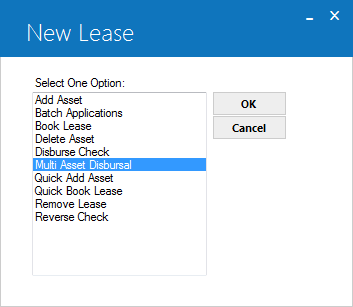
Multi Asset Disbursal is an option of the New Lease update, which can be accessed through the main LeasePak Updates menu, New Lease option, or by entering U0101 into Fast Menu <F2>.
This option is used to disburse multiple assets attached to a lease, commission fees, or other payable if those funds were not disbursed when the lease was initially booked.
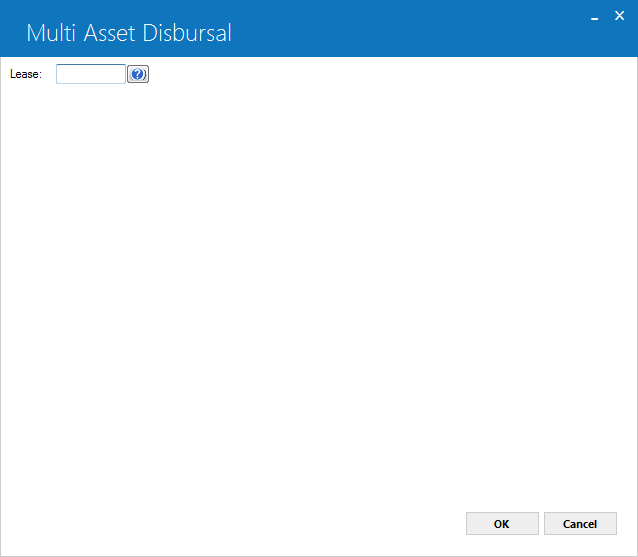
This screen is used to enter the multi asset disbursal information. Note that the disbursement date may not be before the system date. Users will need to enter the lease number in the above screen to disburse multiple asset attached to that specific lease.
 Lease
Lease -
(Mandatory)Enter a valid lease number or colon for the details of the lease assets to disburse attached to that specific lease. Once user enters a valid lease number press OK the following screen will appear:
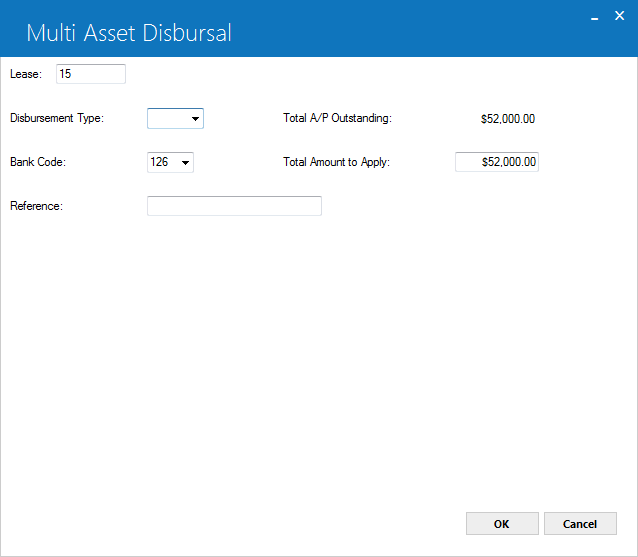
- Disbursement Type
-
(Mandatory)click on the
 dropdown for the options of disbursement types and select one of the type to
disburse multiple aasets attahced to a lease. Followig are the valid disbursement types for multi asset disbursal:
dropdown for the options of disbursement types and select one of the type to
disburse multiple aasets attahced to a lease. Followig are the valid disbursement types for multi asset disbursal:
- MANL If the user enters a Disbursement Type of MANL the asset MUST have a vendor number associated with it. The ACH fields on the vendor are not required. Check Disbursal [U0117] will not process any checks with this code type. An external program can be used to pickup these checks and pass them to the wire transfer A/P system.
- NEWA
- NEWD
- NEWI
- NEWL
- WIRE
Vendor check is to be disbursed in Vendor ACH module which runs as part of the daily EOP. If the user enters a Disbursement Type of NEWA, the asset must have a vendor number associated with it and the vendor must have its ACH fields non-blank. Check Disbursal [U0117] will not process any checks with this code type. The Vendor ACH [U0424] module will pickup these checks and create a standard ACH bank file.
Vendor check is to be disbursed. The name and address of the vendor specified for the asset through Add Asset are automatically displayed on the screen as the payee name and address. They may be changed by changing the Vendor code.
Portions or all of equipment payable are directed to internal accounts instead of disbursed to an external party. No check is created. Ad hoc reports can be generated to complete the internal accounting for NEWI disbursements.
General accounts payable is to be disbursed. The payee name and address must be entered.
If the user enters a Disbursement Type of WIRE the asset must have a vendor number associated with it. The ACH fields on the vendor are not required. The system will auto assign the check number as with the other codes (except MANL). Check Disbursal [U0117] will not process any checks with this code type. An externally written program can be used to pickup these checks and pass them to the wire transfer A/P system.
- Total A/P Outstanding
-
(Read Only)This field will display the total amount of outstanding accounts payable. This field is read only.
- Bank Code
-
(Optional)This field will only appear if the Multiple Banks module has been purchased. It allows the user to specify which bank will disburse the cash. The default bank code is 126. Valid entries are 1, 125-144, and 499-520. Users can change the bank code as required and can select one from dropdown list.
- Total Amount to Apply
-
(Mandatory)Enter the disbursement amount to apply.
- Reference
-
(Mandatory)Enter the check reference to be associated with the disbursement.
- Total Amount Applied
-
(Read Only)Total applied anount will display.
once user enters the required input in the above fields the following screen will appears:
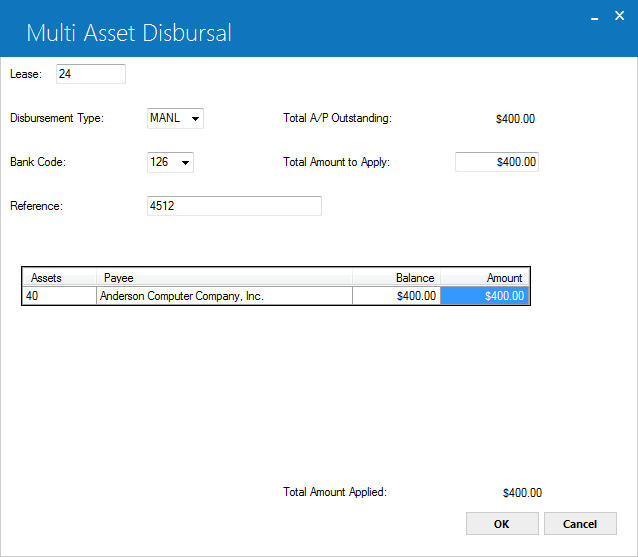
The following grid will show the assets attached to the lease and are going to be disbured with the deatiled information of associated Asset Number, Payee, Asset Balance and Asset Amount.

click in OK button to disbuse multiple assets of a single lease or click on Cancel button to cancel disbursement action on specific lease.
LeasePak Documentation Suite
©
by NetSol Technologies Inc. All rights reserved.
The information contained in this document is the property of NetSol Technologies Inc. Use of the information contained herein is restricted. Conditions of use are subject to change without notice. NetSol Technologies Inc. assumes no liability for any inaccuracy that may appear in this document; the contents of this document do not constitute a promise or warranty. The software described in this document is furnished under license and may be used or copied only in accordance with the terms of said license. Unauthorized use, alteration, or reproduction of this document without the written consent of NetSol Technologies Inc. is prohibited.